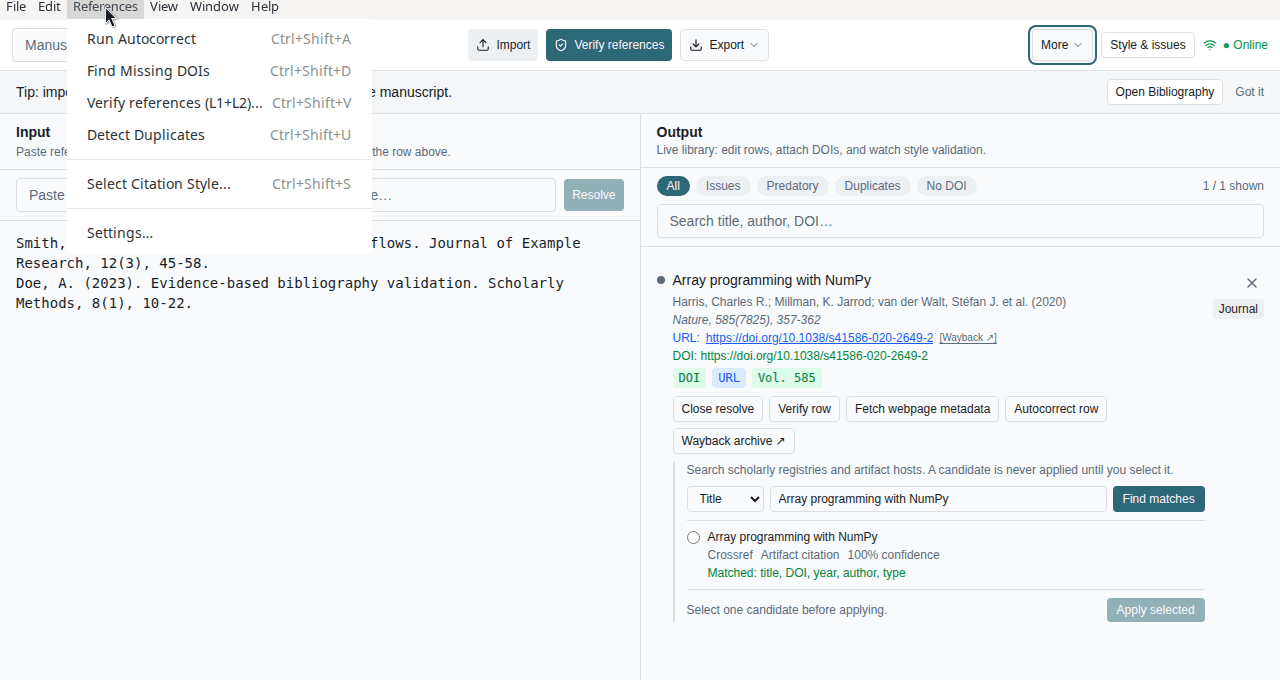
Nassila is keyboard-friendly. Shortcuts below apply on Windows (Ctrl-based).
Bibliography mode
| Shortcut | Action |
|---|---|
| Ctrl+I | Import reference files |
| Ctrl+E | Export bibliography |
| Ctrl+Shift+E | Export CSL JSON |
| Ctrl+Shift+A | Run autocorrect |
| Ctrl+Shift+D | Find missing DOIs |
| Ctrl+Shift+V | Verify references (unified L1+L2) |
| Ctrl+Shift+U | Detect duplicates |
| Ctrl+Z / Ctrl+Shift+Z | Undo / Redo |
Manuscript mode
| Shortcut | Action |
|---|---|
| Ctrl+Enter (focus in manuscript textarea) | Run audit |
Also available from the finding detail panel (after an audit completes): Copy evidence and Jump to Bibliography (scrolls to the manuscript-ref:N row when present).
Manuscript mode uses the same global shortcuts where applicable (Import, Export, Verify when bibliography drawer is open).
Tips
- Run Verify only when online; the shortcut still fires but the run may fail or skip without connectivity.
- Undo/Redo applies to list edits in Bibliography mode after parsing or manual changes.
- For a full workflow walkthrough, see How-to guide.